Pinterest is full of useful and entertaining videos — from cooking tutorials and workout clips to DIY ideas and travel inspiration. The problem is that Pinterest doesn’t offer a built-in
The good news is you can save Pinterest videos directly from your browser without installing any extra app. It only takes a m
Step 1: Copy
First, open the Pinterest app or website on your Android phone.
Find the video you want to download, then:
- Tap the Share button
- Select Copy link
- The Pinterest URL will now be copied to your clipboard
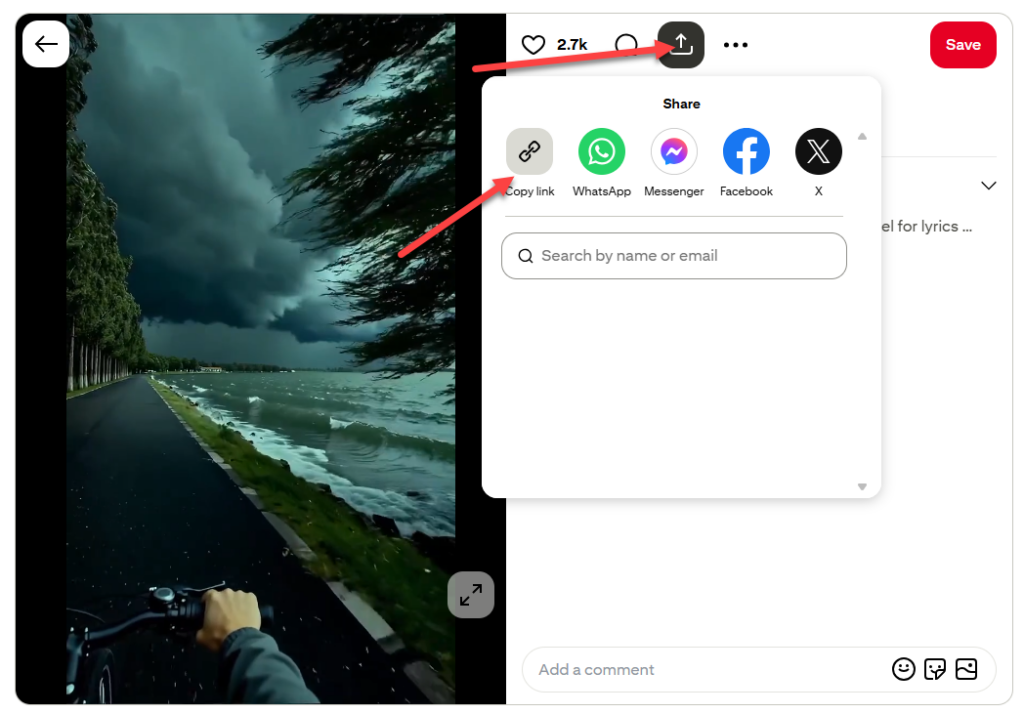
Make sure you copy the actual video Pin link, not a board or profile link. Otherwise, the downloader may not detect the video correctly.
Step 2: Open a Pinterest Video Downloader in Your Browser
Next, open Chrome or any browser on your Android device and go to your preferred Pinterest downloader tool.
A browser-based downloader is usually easier than installing a separate app because:
- No storage space needed
- No account setup
- No permissions required
- Works instantly on most Android phones
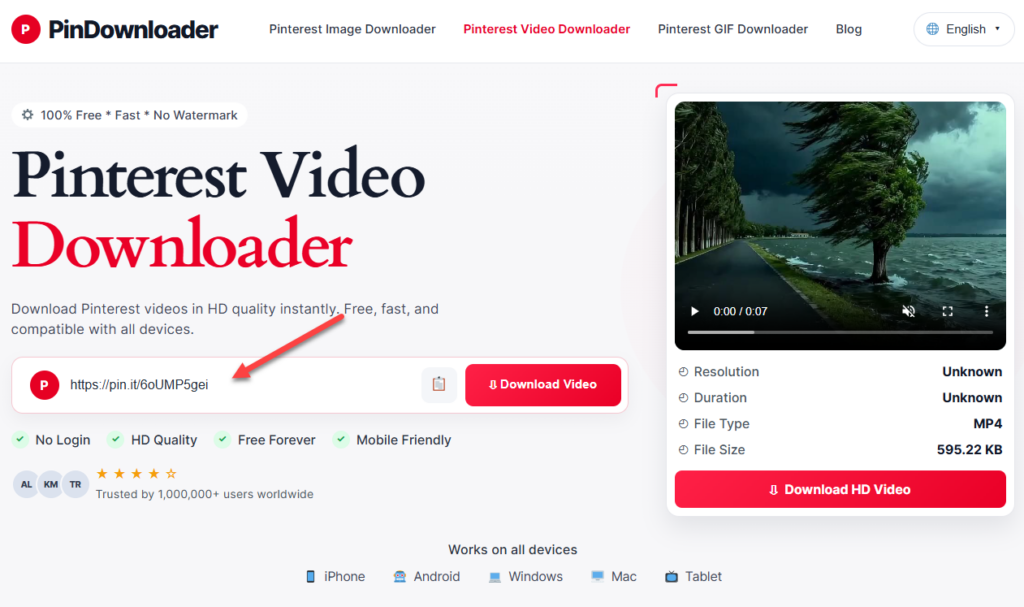
Paste the copied Pinterest link into the download box.
Then tap the Download button.
After a few seconds, the tool should generate available video quality options.
Step 3: Save the Video to Your Android Phone
Choose the video quality you want — usually MP4 format.
Tap Download Video again, and your browser will start downloading the file.
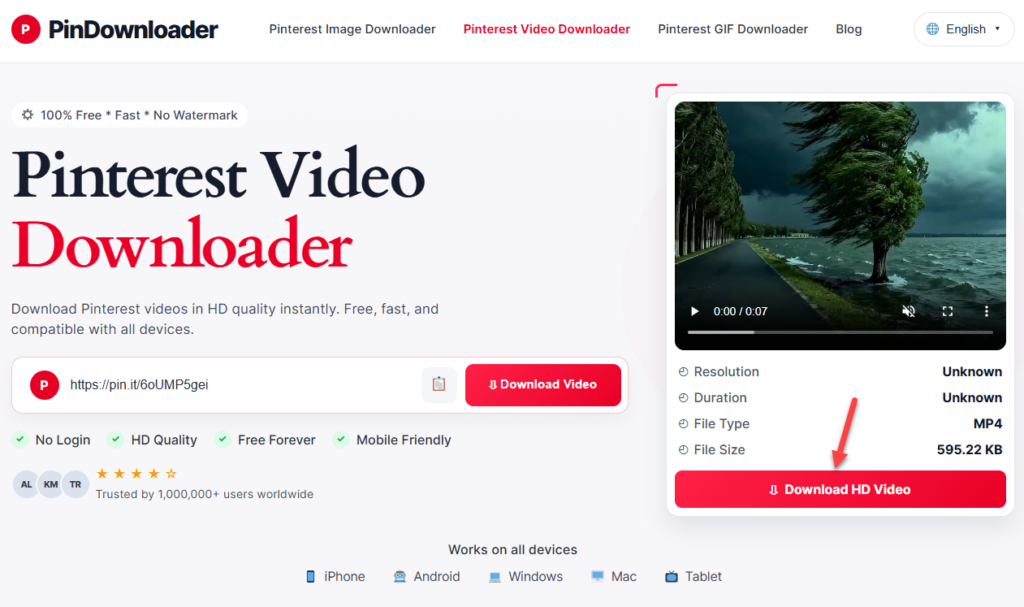
On most Android devices, the video will appear in:
- Downloads folder
- Gallery app
- Google Photos
Depending on your browser settings, you may see a confirmation popup before the download starts.
Common Issues and Fixes
Pinterest Video Not Downloading
If the downloader says the link is invalid or nothing happens:
- Double-check the copied URL
- Refresh the downloader page
- Try another browser like Chrome or Firefox
- Make sure the Pinterest post actually contains a video
Some private or restricted Pins may not be downloadable.
It Downloads an Image Instead of a Video
This usually happens when:
- The Pin is actually an image post
- You copied the wrong Pinterest link
- The video hasn’t fully loaded before copying
Open the Pin again and confirm there’s a play button before copying the URL.
Redirect or Popup Errors
Some download websites open extra tabs or redirect pages on mobile browsers.
If that happens:
- Close the popup tab
- Return to the original page
- Tap download again
Using Chrome with popup blocking enabled usually reduces this issue.
Why Many Android Users Prefer Browser Downloaders
A lot of Pinterest downloader apps on Android come with ads, background permissions, or unnecessary notifications.
Using a browser-based tool is often faster because:
- You don’t need to install anything
- It works across devices
- Updates happen automatically
- No Play Store download required
For quick downloads, the browser method is usually the simplest option.
Tips for Better Video Quality
If you want the best result:
- Download using a stable Wi-Fi connection
- Choose HD or highest available quality
- Avoid heavily compressed reposted Pins
- Download from the original source Pin when possible
Pinterest video quality depends on the original upload, so some videos may naturally look sharper than others.
Is It Safe to Download Pinterest Videos?
In general, yes — if you use a trusted downloader website and avoid suspicious popups or fake buttons.
A few basic precautions help:
- Don’t install random APK files
- Avoid sites asking for account passwords
- Never enable unnecessary browser notifications
- Use well-known browsers like Chrome or Edge
Also remember that downloaded Pinterest content may still belong to the original creator. If you plan to repost videos publicly, it’s best to credit the creator whenever possible.
FAQ
Does the downloaded video have a watermark?
Most Pinterest downloader tools save videos without additional watermarks. However, if the original video already contains a creator watermark (like TikTok branding), that watermark will still appear.
Do I need to log into Pinterest?
No. In most cases, you only need the public Pinterest video link.
Private Pins or restricted content may require login access, but regular public videos usually work without signing in.
Can I use this method on iPhone?
Yes. The same browser-based method also works on iPhone through Safari or Chrome.
The steps are almost identical:
- Copy the Pinterest link
- Open a downloader website
- Paste the URL
- Save the video
On iPhone, the file may go into the Files app before appearing in Photos.
Final Thoughts
Downloading Pinterest videos on Android without an app is much easier than most people think. Once you know how to copy the Pin link and use a browser-based downloader, the whole process takes less than a minute.
You don’t need extra apps, registrations, or complicated settings — just your browser and the Pinterest video URL.
Leave a Reply